Cancellation & Denial Codes
 Required Permissions (Click to Read)
To follow this topic, your user account must have access to the GM Functions module.
Your security role must have the following permission(s):
- Miscellaneous Codes
If you do not have these permissions and believe you should, please reach out to your property's manager or administrator for further assistance.
When guests cancel prior to their booking, or change their mind before confirming their stay (resulting in a denial A term used to describe an incomplete booking. Opening a new booking then exiting before the booking has been saved and confirmed is considered a "denial."), it helps to know why they did so in the event its something you or your manager can change and in turn improve guest retention and higher occupancy levels. Chorum allows you to specify a list of reason codes for either scenario, similar to marketing or booking source codes, but aimed at helping you track reasons guests may choose not to stay with your property.
To begin, access the GM Functions module, then under the Misc. Codes folder access the Denial/Cancellations menu.
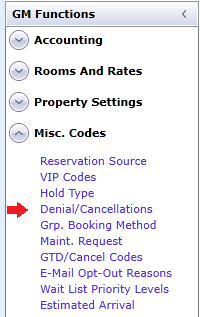
Use the New button at the top of the menu to add a blank row for setup. Otherwise, select the reason code you would like to update and edit the desired column(s). When done editing a given reason code, save your work before moving on to the next one.
Be mindful that once a new reason code has been saved, it cannot be deleted (only marked inactive). Furthermore, the Cancellation / Denial checkbox cannot be modified after it has been saved.
When finished, the menu should look similar to the below example.
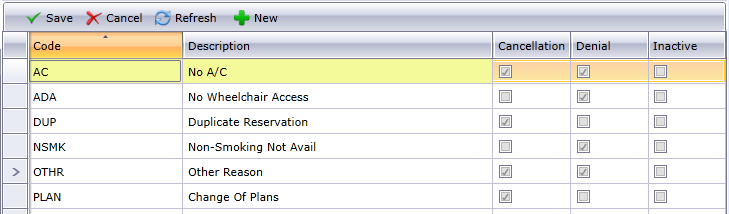
See below for a description of each column.
|
Column |
Description |
|---|---|
|
Code |
The abbreviated code to be displayed on appropriate menus. This should be between 3 - 6 characters, limited to letters and numbers. |
|
Description |
The description to be displayed on the Cancellations (Report). For best results, the description should be no more than five or six words. |
|
Cancellation |
Check this option to mark the code for use with cancellations. |
|
Denial |
Check this option to mark the code for use with denials. |
|
Inactive |
Check this option to remove the code from use. Historical data is preserved, but new cancellations or denials will no longer be able to use the code. |
Related Topics
| GM Functions Overview | Learn to navigate the GM Functions module. |
| Cancellations | Learn how to cancel a guest's booking. |
| No-Shows | Learn how to handle guests that never arrive. |
